

Game Vortex APK
Game Vortex (G-Vortex) is my great helper for daily gaming. It is a game optimization tool specifically designed for Android devices. I use it to improve my gaming experience on my device and optimize performance with one click, so games run more smoothly. I often faced lag, delays, and unstable frame rates while gaming, but since using Game Vortex, those problems have gone down a lot.
| Name | Game Vortex |
| Latest Version | 3.2 |
| Size | 4.71 MB |
| Update on | 1 Hour Ago |
| Compatible with | Android 5.0+ |
| Price | Free |
| Developer | RezONE Dev |
What Exactly is Game Vortex?
Game Vortex is a top-notch Android game optimization tool. I found it recently, and it’s perfect for gamers like me who love playing on their devices. It smartly adjusts CPU, GPU, and memory use to help games run smoother, with less lag and steadier frame rates.
Even during demanding games like PUBG Mobile, Call of Duty Mobile, or Free Fire, it doesn’t lag anymore. Game Vortex acts like an accelerator and performance manager for my device gaming.
Key Features of Game Vortex:
- One-Click Acceleration
One of my favorite features of Game Vortex is its one-click optimization. Before I open a game, I click it. It cleans up the background, frees memory, and optimizes settings to let the device enter the best gaming state instantly. The also has an automatic optimization mode. When I play games and see a drop in performance, like lag or low frame rates, the system boosts performance automatically. - Improve Game Performance
The worst part of gaming is lag and frame drops. However, after trying Game Vortex, I noticed a significant difference; it features a one-click option to clear background processes and cache. This quickly frees up memory, lowers CPU usage, and helps the game run smoothly. I’ve tried it, and the frame rate is better; the controls are also more responsive. - Reduce Network Latency
Another feature that surprised me is its network optimization. Game Vortex picks the best network nodes to cut down latency and packet loss while I game online. During competitive games, the network is more stable. Team fights no longer lag, which greatly improves the experience. - Intelligent Memory Cleanup, Say Goodbye to Lag
Game Vortex finds background programs that use memory but aren’t helpful. It closes them with one click, frees up more RAM for gaming.
Cons:
- The optimization effect is also limited
To be honest, Game Vortex can indeed optimize the gaming experience, but it can’t perform magic. After all, it can’t enhance the hardware performance of the phone itself. My device is two years old and not very high-end, but that really helps reduce lag a bit, though it still drops frames. It also heats up when playing high-performance games. If the hardware can’t keep up, software optimization will only go so far. - Some functions require permission and cooperation
For better optimization, Game Vortex needs certain system permissions. These include reading the application list and stopping background processes. However, I found that some Android systems are particularly strict about permission management. You need to enable permissions in the settings. Otherwise, some functions might not work right. - Network acceleration is limited
Game Vortex has network optimization features. It mainly improves local DNS and network settings, and tweaks help my gaming a bit. If you play demanding games, like competitive ones on overseas servers, the optimization might fall short.
Game Vortex Screenshots:
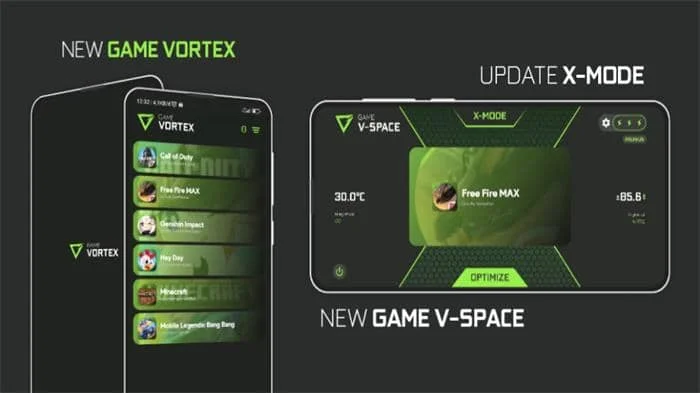
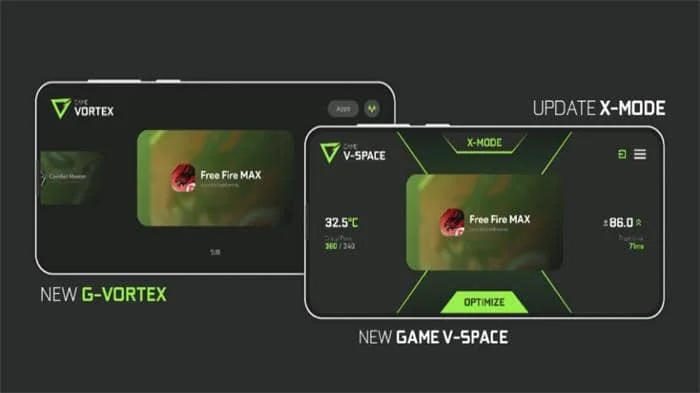
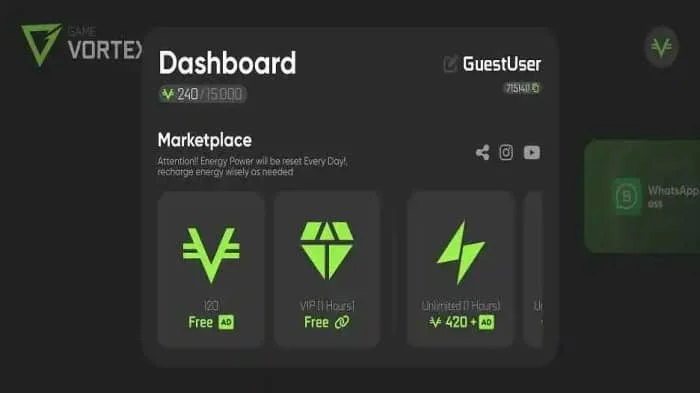
Why Game Vortex is Popular:
- Exclusive Game Space
Once you enter the game space, your phone will switch to game mode. The mode blocks all notifications and call interruptions. When you play games, you won’t be interrupted by WeChat or text messages. - Game Filter
You can add your favorite games to the filter list. Every time you open them, Game Vortex will use your saved optimization settings. - Real-time Monitoring
The coolest part is its floating window during gameplay. It shows real-time data like frame rate, CPU/GPU load, and memory usage. - Identify Resource-Hogging Software
Game Vortex can check all apps on your device to show which ones use a lot of resources or run slowly. This includes some pre-installed software, and it will suggest software to uninstall, helping free up system resources for gaming.
Who Should Use Game Vortex:
- Device configuration is generally good
If you have a mid-range Android device and face lag or overheating with big games, Game Vortex can help you. It can unlock the device’s full potential to let even old models run games smoothly through cleaning and optimization. As a result, the gaming life of the device gets extended. - Multitasking game users
Some players often use social apps while gaming, and they also switch between different games a lot. In this case, background applications can easily take up resources, causing game lag. Game Vortex’s features for game space and memory cleaning help manage the background. This way, games get most of the performance they need.
Tips for Using Game Vortex:
- One-click optimization regularly
Develop the habit of using one-click acceleration before starting the game, it will clean up unnecessary background processes and cache. You’ll have enough memory and resources when starting the game. For games that run for a long time, you can also exit the game periodically and click to speed up cleanup. - Enter V-Space
When playing games, enter V-Space mode to put your device in do-not-disturb mode. Notifications and calls will be blocked, so you won’t have any interruptions. - Add frequently used games to the filter
Make good use of the game filter by adding your frequently played games. Every time you start these games, Game Vortex automatically sets optimizations.
About Game Vortex APK:
Game Vortex APK is an excellent assistant for game acceleration. It allows players to run games more smoothly and fluidly. Before opening a game, it clears memory and shuts down unrelated background programs to help you focus on the game without interruptions from system lags.
Benefits of Using Game Vortex APK:
- Makes games run faster and more stably
A major benefit of Game Vortex APK is its ability to boost game performance. It smartly manages resources on my phone to help the CPU and memory work well without competing for what they need. Games start faster and run more smoothly, rarely freeze or drop frames. - Game latency is reduced
Latency in games worries me the most, it is especially for online battle games like Honor of Kings and Peace Elite. Even a slight increase in latency can affect the whole game’s performance. Game Vortex APK optimizes your network connections and system settings to reduce latency, smooth the network. - Memory cleanup becomes easy and simple
Before, I had to clear the background manually. If I didn’t, the game would lag after some time. Game Vortex APK helps me clean up background processes and useless cache to free up memory and gives me more resources for the game. Now, when I open games, there’s almost no lag, and the experience has really improved a lot. - Let the device last a bit longer
I’ve always noticed that phones heat up and lag after long use. It is especially true when playing games because the CPU is under heavy load. After using Game Vortex APK, it can manage system resources well, helping prevent long-term overload on the device. I think this helps my device last longer, which will support me for a few more games.
How To Install Game Vortex APK:
- Download the latest version of the Game Vortex APK from this page.
- When the downloading process ends, go to My Files, find the downloaded file, and click on it.
- It will request permission from your device to ensure a successful installation.
- When the installation is done, click the icon to open the Game Vortex. Then, start optimizing your games.
Frequently Asked Questions About Game Vortex:
- Can Game Vortex APK be used with other optimization software?
It’s best not to run several optimization programs at the same time. Doing so can cause conflicts and slow down your device. - Is Game Vortex free?
Yes, Game Vortex is a free game booster. You can download it and use its main features without any payment. - What is the vortex game mode?
Game Vortex mode boosts game performance. It optimizes system resources and pauses background apps when turned on, to help your device run games better. - What devices does Game Vortex support?
Game Vortex supports multiple platforms, including Android and Windows. You can use it for game optimization on your device, PC, or other supported platforms.



Leave a Reply